No other operating system shows you exactly what an app holds — which capabilities it has been granted — and lets you revoke any of them, live, without restarting the app or the OS. That one property is the reason Lumen exists as a distinct design language rather than a visual style. The chrome, the palette, the typography, the animation curves — all of it is in service of making that single fact legible.
§9 Capability UI: the one thing no other OS can do
In sigilOS, every process holds a set of explicit capabilities: CAP_NET for network access, CAP_ACCEL for GPU use, CAP_FB_OVERLAY for screen overlays, an audio slot for sound output, a microphone consent token for capture, a VFS session token for file access. These are not permission bits stored in a database — they are unforgeable handles held in kernel memory, bound to the process that received them.
Lumen's §9 principle is that the UI must reflect this at all times:
The revoke action is not a setting buried in a preferences panel — it is a first-class surface on every window's chrome. When you revoke AU_MIC from Recorder, the audio session's mic flag is cleared in the kernel. The app's next au_mic_grant call returns -1. There is no pathway for an EL0 process to re-grant itself a revoked capability — the grant always flows from the OS broker, which holds the sentinel token that EL0 cannot observe.
This is what §9 means in practice: the UI is the control surface for the kernel's capability model, not an approximation of it.
The six principles
th(role, ch) is the only colour call.The palette
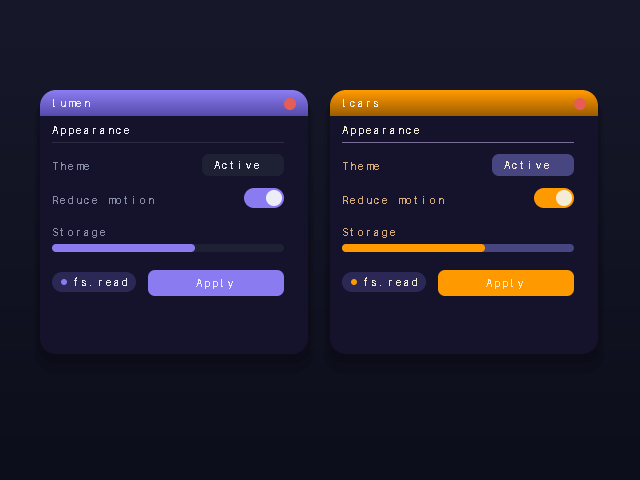
Lumen-dark is the default. Lumen-light activates during the daytime window set by the night-mode scheduler. LCARS is available as an alternate theme for retro aesthetic. All three are full palette swaps — the same chrome code, different semantic role values.
#0e0e14#a78bfa#f0effe#4a4562#2a2a33Typography is Inter for UI copy and JetBrains Mono for terminal and code surfaces. Both are loaded by the Lumen font service and rasterized with the SDF rasterizer — anti-aliased at any scale, gamma-correct partial coverage. No bitmap fallback. On the Pi 3 floor, the SDF scalar path runs on CPU; the GPU path takes over on accelerated hardware.
The compositor path
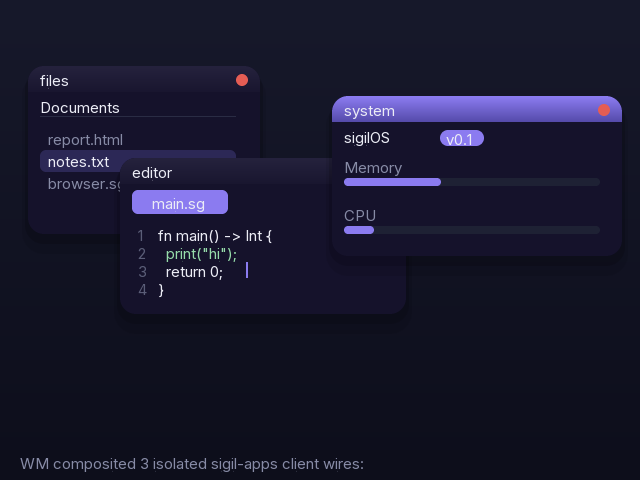
Lumen's compositor is the piece that actually draws the chrome. The window manager holds the stacking order and the rect table. For each frame it calls desk_compose, which:
- Fills the desktop surface with the current theme's background colour
- Draws the minibar at the bottom for any minimized windows (
dk_minibar) - For each visible window in stacking order: fills the titlebar gradient, draws the traffic-light dots (close/minimize/full-screen), and blits the window client area
- Reads active overlay slots from Kernel's
OVLregistry and composites them in DSO order - Draws the cursor
The titlebar gradient and the soft shadow are the two elements that make Lumen visually distinctive from a bare framebuffer UI. Both are drawn with comp_blit and comp_composite (src-over alpha blend) in the gpucomp layer — GPU-accelerated on x86, scalar on ARM until the Pi 4 GPU driver lands.
The night-mode scheduler ties into the compositor through the same th() role system: theme_set(THEME_DARK) or theme_set(THEME_LIGHT) flips the active palette and the compositor re-reads it on the next frame. The transition is immediate — no reload, no flicker.
Runtime theming and LCARS
Lumen's theming is not a compile-time choice. The runtime palette is a cell of five colour values — surface, accent, text, text_dim, line. theme_set writes the cell; every widget call to th(role, ch) reads from it. Switching themes takes one write. The entire running desktop re-renders in the new palette on the next compositor tick.
LCARS (Library Computer Access/Retrieval System) is the third palette — orange accent on black, amber and blue secondary colours — shipped because the NeXT aesthetic and the LCARS aesthetic are the two poles of what sigilOS's heritage suggests. Both are full Lumen — they satisfy all six principles. The orange accent passes the same contrast ratios as the purple one.
What Lumen is not
Lumen is not a UI toolkit. There is no widget library, no layout engine, no Objective-C runtime. The compositor draws rects and glyphs. Apps draw into their client region using the same framebuffer primitives. What makes an app "Lumen" is that it uses th() for colours, draws into the expected region, and declares its capabilities honestly.
Lumen is also not a design goal for its own sake — it exists because the capability model needs to be made legible. If the OS can revoke your microphone access at any point, you need to be able to see that your microphone access is held, to understand what revoking it means, and to do it in one gesture. The chrome is that gesture surface. The principles are the constraints that keep the chrome honest.